 |
Welcome To Evlithium Best Store For Lithium Iron Phosphate (LiFePO4) Battery |
 |
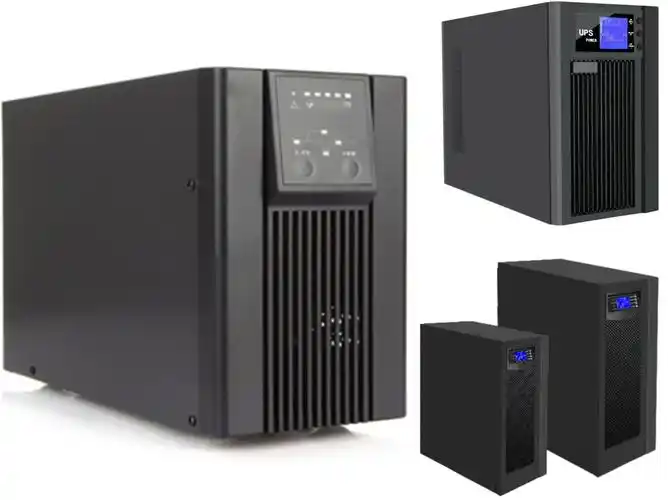
Power outages are unpredictable — and they strike at the worst possible moments. Whether you're mid-presentation, running a server, or managing life-critical medical equipment, a sudden blackout can cause data loss, hardware damage, and serious disruption. That's where UPS batteries come in.
A UPS (Uninterruptible Power Supply) battery is the core energy storage component inside a UPS system — the device that keeps your equipment running when the grid goes down. In this guide, you'll learn exactly what UPS batteries are, how they work, the types available, and why they're considered essential for both home users and enterprise operations.
A UPS battery is a rechargeable cell housed inside an Uninterruptible Power Supply unit. Its job is simple but vital: store electrical energy and deliver it instantly when main power fails.
Unlike a standard backup generator — which can take seconds or even minutes to start — a UPS battery switches over in milliseconds. That near-instant response time is what makes UPS systems essential for sensitive electronics that cannot tolerate even a brief interruption.
The battery continuously charges while the UPS is connected to mains power. The moment an outage or voltage irregularity is detected, the UPS draws from its battery to keep connected devices running without any noticeable gap.
UPS batteries operate within a larger system that monitors incoming power 24/7. Here's the basic process:
Some UPS models — called online (double-conversion) UPS systems — route all power through the battery constantly, offering the cleanest and most reliable protection. Others, called standby UPS systems, only activate the battery when a fault is detected.
Not all UPS batteries are the same. The type of battery inside your UPS determines its lifespan, weight, maintenance needs, and performance.
VRLA batteries — also called sealed lead-acid (SLA) batteries — are the most common type found in UPS units today. They come in two subtypes:
VRLA batteries typically last 3–5 years and are the standard choice for home, office, and mid-range IT environments.
Lithium-ion UPS batteries are increasingly popular in enterprise and data center environments. Key advantages include:
The tradeoff is higher upfront cost — though lower replacement frequency often makes them more economical over time.
NiCd batteries are used in specialized, heavy-duty UPS installations — particularly in industrial settings and extreme temperature environments. They're durable and can withstand high discharge rates, but their high cost and environmental concerns (cadmium is toxic) limit their use to niche applications.
UPS batteries aren't just a convenience — in many situations, they're a necessity. Here's why they matter so much:
An abrupt power cut to a computer or server mid-operation doesn't just halt work. It can corrupt open files, damage databases, and — in worst-case scenarios — destroy the operating system or storage hardware. A UPS battery gives you the time to save work and shut down properly.
Power irregularities — surges, sags, and spikes — are as damaging as full outages. UPS systems with battery backup also include surge protection and voltage regulation, shielding connected devices from electrical noise that slowly degrades hardware over time.
For hospitals, data centers, telecommunications infrastructure, and emergency services, even a one-second power gap is unacceptable. UPS batteries bridge the gap between mains failure and generator startup, ensuring zero interruption to life-critical or mission-critical operations.
Even for home or small office users, a UPS battery buys 5 to 30 minutes of runtime — enough to save work, properly shut down systems, or wait out a brief outage without disruption.
Brownouts — where voltage dips but doesn't cut out entirely — are actually more common than full outages and equally damaging. UPS systems detect under-voltage conditions and compensate using battery power, something a standard power strip cannot do.
Battery lifespan depends on battery chemistry, operating temperature, charge cycles, and how deeply it's discharged during outages.
| Battery Type | Typical Lifespan | Best For |
|---|---|---|
| VRLA / AGM | 3–5 years | Home, office, small IT |
| Lithium-Ion | 8–10 years | Enterprise, data centers |
| NiCd | 15–20 years | Industrial, extreme environments |
Heat is the number one enemy of UPS batteries. Every 10°C rise above the rated operating temperature can cut battery life in half. Keep UPS units in cool, ventilated spaces to maximize battery longevity.
Most UPS units include battery health monitoring software that alerts you when replacement is needed — don't ignore these warnings.
Watch for these warning signals:
Most UPS manufacturers recommend annual battery testing and replacement every 3–5 years for VRLA units as a general rule.
A UPS battery stores electrical energy and delivers it instantly to connected devices when mains power fails or fluctuates. It acts as a buffer between your equipment and the power grid, ensuring continuous, clean power during outages, surges, or brownouts.
Runtime depends on battery capacity (measured in volt-amperes or watts) and the power draw of connected devices. A typical home UPS might run a desktop computer for 10–20 minutes; a larger unit can keep a server running for an hour or more. Most UPS manufacturers provide runtime calculators on their websites.
Yes, in most cases. VRLA batteries in consumer and office-grade UPS units are designed for user replacement — no specialized tools required. Always use the same battery type and rating specified by the manufacturer, and follow proper disposal procedures for the old battery.
VRLA/AGM batteries should typically be replaced every 3–5 years, or sooner if the UPS reports a battery fault. Lithium-ion batteries last 8–10 years. Annual runtime testing helps catch degradation early, before a real outage exposes the problem.
Standard VRLA batteries are sealed and safe for indoor use when handled correctly. Avoid puncturing, overcharging, or exposing them to extreme heat. Damaged or swollen batteries should be handled with care and disposed of at a certified recycling facility — lead-acid batteries are classified as hazardous waste.
UPS batteries are the unsung backbone of power protection for homes, offices, and enterprise infrastructure alike. They deliver instant energy during outages, protect against power irregularities, prevent data loss, and keep critical systems running without interruption.
Key takeaways:
Now that you understand what UPS batteries are and why they're critical, you're equipped to choose the right solution for your needs — and maintain it properly to ensure protection when you need it most.
Edit by paco
Last Update:2026-05-26 10:14:05
All Rights reserved © 2026 Evlithium Limited